
Agent Troubleshooting
How Error Messages Are Displayed
If the Devise Status Agent (DS Agent) or Embedded Status Agent (ES Agent) cannot establish communication with the ERMS Infra, the following error message will be displayed.
If an error message is displayed, handle it accordingly.
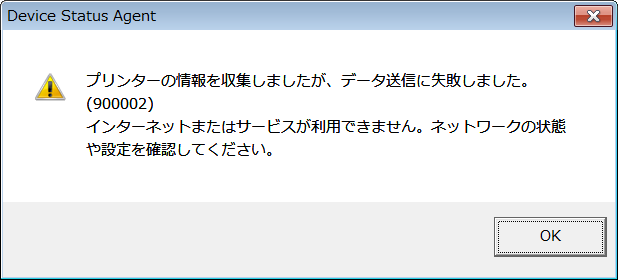
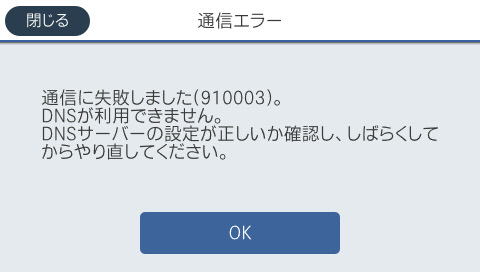
Error Numbers List and Handling
Communication Error Numbers List. Network Communication Errors.
ES Agent Error No. | Remote Terminal Error No. | DS Agent Error No. | Error Cause | |
|---|---|---|---|---|
Communication Check | Data Transmission | |||
910001 | - | - | - | Failed to execute from the panel (or WebConfig) because "Send machine information" is being executed from WebConfig (or panel) or by periodic transmission. (Or, it may be that the response may not be returned due to DS server down or overload.) |
910002 | - | 900002 | 900002 | The LAN cable is not connected, or the wireless connection (setting) is not established. (Or, it may be that the response may not be returned due to ERMS Infra down or overload.) |
- | 900103 | 900103 | Other errors | |
- | 900200 | - | Server response result invalid. | |
- | - | 900201 | 900301 | Error in XML web service method over SOAP. |
910003 | - | - | - | The DNS address is not set, or the specified address cannot be accessed. |
910005 | - | - | - | The specified proxy address is not a proxy server, or the proxy service is not running. |
910004 | - | 900004 | 900004 | The domain name cannot be resolved by DNS on the PC where the DS Agent is installed. The DNS service is not running on the printer for which the ES Agent is set, or the domain name is not registered on the DNS server. |
- | - | 900203 | 900303 | Communication to the remote service point failed at the transport level. |
- | - | 900204 | 900304 | A complete response was not received from the remote server. |
- | - | 900205 | 900305 | Failed to send complete request to remote server. |
- | - | 900206 | 900306 | The request was pipelined and the connection was closed before the response was received. |
- | - | 900207 | 900307 | The request was canceled or an unclassifiable error occurred. |
- | - | 900209 | 900309 | The connection was terminated too early. |
- | - | 900210 | 900310 | Server certificate could not be verified. |
910006 | - | 900006 | 900006 | Incorrect proxy server settings. Or certificate error. |
- | 910101 | - | - |
|
- | 910102 | - | - | No response is returned (DS server down, overload, etc.) |
- | 910103 | - | - | Certificate error (HTTPS) |
- | 910104 | - | - | Incorrect data sent from the USB. |
Communication Error Numbers List. Errors When Accessing the Network
| ES Agent Error No. | Remote Terminal Error No. | DS Agent Error No. | Error Cause | |
|---|---|---|---|---|
| Communication Check | Data Transmission | |||
| - | 910105 | - | - |
|
| - | 910106 | - | - |
|
| - | 910107 | - | - |
|
| - | 910108 | - | - |
|
| - | 910109 | - | - |
|
| - | 910110 | - | - | The data sent from Remote Terminal Agent is invalid. (Control message error sent from Remote Terminal Agent, time information cannot be obtained, information saving success notification from DS server cannot be obtained, etc.) |
| - | 910111 | - | - | An unexpected error occurred in ES Agent. (Received an unsupported HTTP Response, etc.) |
| - | - | 900212 | 900312 | Server response is not a valid HTTP response. |
| - | - | 900213 | 900313 | A connection was closed unexpectedly for a request that specified a Keep-alive header. |
| - | - | 900214 | 900314 | Internal asynchronous request pending. |
| - | - | 900215 | 900315 | No response was received during the request timeout period. |
| - | - | 900217 | 900317 | An exception of unknown type occurred. |
| - | - | 900218 | 900318 | A message exceeding the limit length was passed while sending a request to or receiving a response from the server. |
| - | - | 900219 | 900319 | The specified cache entry was not found. |
| - | - | 900220 | 900320 | The request was disallowed by the cache policy. |
Communication Error Numbers List. HTTP Status 1XX (Information) to 2XX (Success)
| ES Agent Error No. | Remote Terminal Error No. | DS Agent Error No. | Error Cause | |
|---|---|---|---|---|
| Communication Check | Data Transmission | |||
| - | - | 900240 | 900340 | Equivalent to HTTP status 100. |
| - | - | 900241 | 900341 | Equivalent to HTTP status 101. |
| - | - | 900242 | 900342 | Equivalent to HTTP status 200. |
| - | - | 900243 | 900343 | Equivalent to HTTP status 201. |
| - | - | 900244 | 900344 | Equivalent to HTTP status 202. |
| - | - | 900245 | 900345 | Equivalent to HTTP status 203. |
| - | - | 900246 | 900346 | Equivalent to HTTP status 204. |
| - | - | 900247 | 900347 | Equivalent to HTTP status 205. |
| - | - | 900248 | 900348 | Equivalent to HTTP status 206. |
Communication Error Numbers List. HTTP Status 3XX (Transmission)
| ES Agent Error No. | Remote Terminal Error No. | DS Agent Error No. | Error Cause | |
|---|---|---|---|---|
| Communication Check | Data Transmission | |||
| - | - | 900249 | 900349 | Equivalent to HTTP status 300. |
| - | - | 900250 | 900350 | Missing number. |
| - | - | 900251 | 900351 | Equivalent to HTTP status 301. |
| - | - | 900252 | 900352 | Missing number. |
| - | - | 900253 | 900353 | Equivalent to HTTP status 302. |
| - | - | 900254 | 900354 | Missing number. |
| - | - | 900255 | 900355 | Equivalent to HTTP status 303. |
| - | - | 900256 | 900356 | Missing number. |
| - | - | 900257 | 900357 | Equivalent to HTTP status 304. |
| - | - | 900258 | 900358 | Equivalent to HTTP status 305. |
| - | - | 900259 | 900359 | Equivalent to HTTP status 306. |
| - | - | 900260 | 900360 | Equivalent to HTTP status 307. |
| - | - | 900261 | 900361 | Missing number. |
Communication Error Numbers List. HTTP Status 4XX (Abnormal Client Error)
| ES Agent Error No. | Remote Terminal Error No. | DS Agent Error No. | Error Cause | |
|---|---|---|---|---|
| Communication Check | Data Transmission | |||
| - | - | 900262 | 900362 | Equivalent to HTTP status 400. |
| - | - | 900263 | 900363 | Equivalent to HTTP status 401. |
| - | - | 900264 | 900364 | Equivalent to HTTP status 402. |
| - | - | 900265 | 900365 | Equivalent to HTTP status 403. |
| - | - | 900266 | 900366 | Equivalent to HTTP status 404. |
| - | - | 900267 | 900367 | Equivalent to HTTP status 405. |
| - | - | 900268 | 900368 | Equivalent to HTTP status 406. |
| - | - | 900269 | 900369 | Equivalent to HTTP status 407. |
| - | - | 900270 | 900370 | Equivalent to HTTP status 408. |
| - | - | 900271 | 900371 | Equivalent to HTTP status 409. |
| - | - | 900272 | 900372 | Equivalent to HTTP status 410. |
| - | - | 900273 | 900373 | Equivalent to HTTP status 411. |
| - | - | 900274 | 900374 | Equivalent to HTTP status 412. |
| - | - | 900275 | 900375 | Equivalent to HTTP status 413. |
| - | - | 900276 | 900376 | Equivalent to HTTP status 414. |
| - | - | 900277 | 900377 | Equivalent to HTTP status 415. |
| - | - | 900278 | 900378 | Equivalent to HTTP status 416. |
| - | - | 900279 | 900379 | Equivalent to HTTP status 417. |
Communication Error Numbers List. HTTP Status 5XX (Abnormal Server Error)
| ES Agent Error No. | Remote Terminal Error No. | DS Agent Error No. | Error Cause | |
|---|---|---|---|---|
| Communication Check | Data Transmission | |||
| - | - | 900280 | 900380 | Equivalent to HTTP status 500. |
| - | - | 900281 | 900381 | Equivalent to HTTP status 501. |
| - | - | 900282 | 900382 | Equivalent to HTTP status 502. |
| - | - | 900283 | 900383 | Equivalent to HTTP status 503. |
| - | - | 900284 | 900384 | Equivalent to HTTP status 504. |
| - | - | 900285 | 900385 | Equivalent to HTTP status 505. |
Error Detection Flow Chart
Error detection flow of Embedded Status Agent (ES Agent) is as follows.

How to Handle Each Error (ES Agent)
Error No. | Communication Result Display | Error Cause and Handling Method |
|---|---|---|
910001 | Communication failed (XXXXXX) | Failed to execute from the panel (or WebConfig) because "Send machine information" is being executed from WebConfig (or panel) or by periodic transmission. |
910002 | Communication failed (XXXXXX) | The LAN cable is not connected, or the wireless connection (setting) is not established. |
910003 | Communication failed (XXXXXX) | The DNS address is not set, or the specified address cannot be accessed. |
910004 | Communication failed (XXXXXX) | The DNS service is not running on the printer for which the ES Agent is set, or the domain name is not registered on the DNS server. |
910005 | Communication failed (XXXXXX) | The specified proxy address is not a proxy server, or the proxy service is not running. |
910006 | Communication failed (XXXXXX) | Incorrect proxy server settings. Or certificate error. |
Error Detection Flow Chart
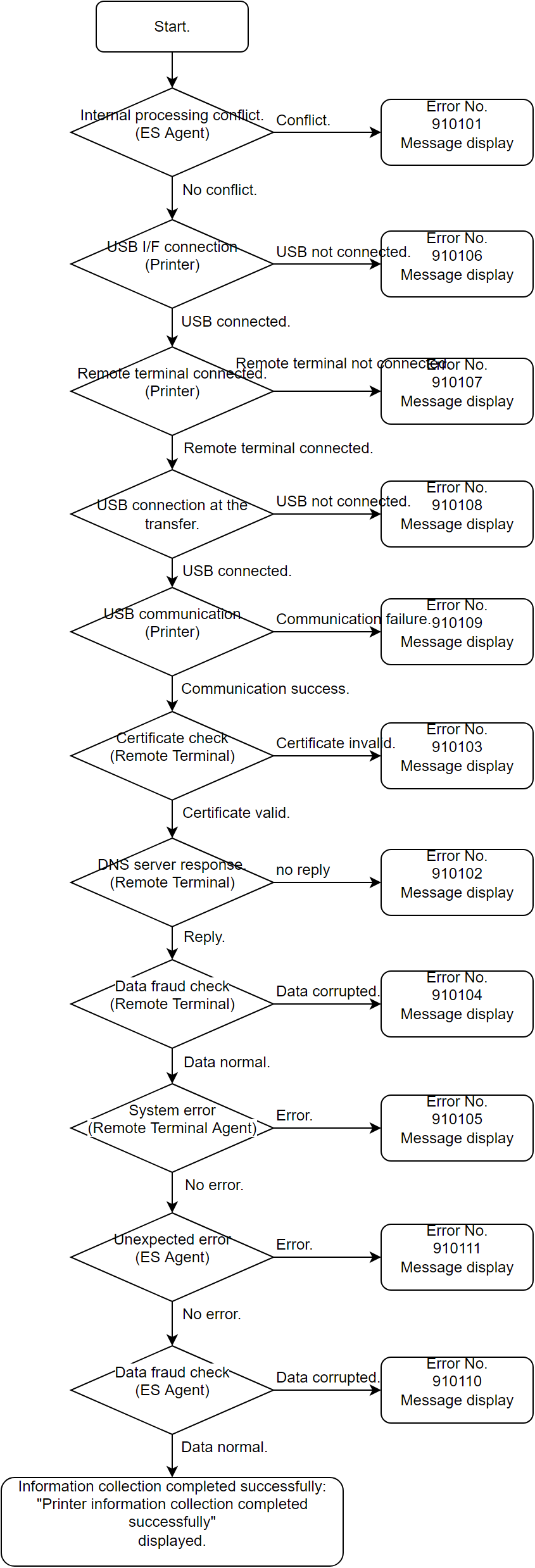
The remote terminal error detection flow is as follows.
How to Handle Each Error (Remote Terminal)
Error No. | Communication Result Display | Error Cause and Handling Method |
|---|---|---|
910101 | Communication failed (XXXXXX) |
|
910102 | Communication failed (XXXXXX) |
|
910103 | Communication failed (XXXXXX) |
|
910104 | Communication failed (XXXXXX) |
|
910105 | Communication failed (XXXXXX) |
|
910106 | Communication failed (XXXXXX) |
|
910107 | Communication failed (XXXXXX) |
|
910108 | Communication failed (XXXXXX) |
|
910109 | Communication failed (XXXXXX) |
|
910110 | Communication failed (XXXXXX) |
|
910111 | Communication failed (XXXXXX) |
|
How to Handle Each Error (DS Agent)
Error No. | Communication Result Display | Error Cause and Handling Method |
|---|---|---|
900002 | Printer information was collected, but data transmission failed. | The LAN cable is not connected, or the wireless connection (setting) is not established. |
900004 | Printer information was collected, but data transmission failed. | Domain name cannot be resolved in DNS. |
900006 | Printer information was collected, but data transmission failed. | Incorrect proxy server settings. Or certificate error. |
* | Printer information was collected, but data transmission failed. | * |
*: Refer to the error number list for detailed error numbers.
Troubleshooting and points to check when a network failure occurs.
Failure Point | Items to Check | What to Check |
|---|---|---|
Physical Connection | Connection order. | In the case of normal network equipment, the connection work is the last step after setting the equipment, but this product is the first connection. When the wiring work is done at the end, enable the wired connection. |
Check the cables connection. | Are you connecting the straight cable or cross cable by mistake? Are you using Category 6 or Category 5e cables? | |
Broken Cable | Connector claws are cracked or missing. | |
Network Interface, Gateway Settings | IP address. Subnet mask and default gateway settings. | Check network settings (IP address, subnet mask, default gateway). |
Duplicate IP address | It is necessary to check whether the IP address set automatically or manually is not duplicated with other devices. | |
Security device settings. | When setting the IP address automatically, the IP address may not be set due to security products or DHCP settings, or the IP address may be deleted after a while even if the IP address is temporarily set. Sometimes. | |
Enable Wi-Fi and wireless settings (SSID, password). | Enable wireless settings. | Epson printers have one network setting, but wired and wireless settings are controlled exclusively. Check if changing the wireless/wired connection does not fix the problem. |
Wi-Fi wireless standard matching. | Is the access point compatible with IEEE802.11b/g/n compliant 2.4 GHz, and are the network settings correct? | |
Encryption method setting, SSID/password0 | Is the printer connected with the encryption method set by the access point, and is the SSID and password set? |